使用QEMU调试Linux内核
本文是一个快速记录,旨在记录使用 QEMU 调试 Linux 内核的方法,文章内容比较短,内容也比较浅显,不会对具体原理进行分析,主打一个够用。使用的 QEMU 版本为 6.2,Linux 内核版本为 5.10,指令集架构为 x86_64。
使用 monitor
使用 monitor 的前提是要先启用该功能,一般将其设置在指定的 telnet 端口(如 6789):
1 | -monitor telnet:localhost:6789,server,nowait,nodelay |
使用 monitor 调试的基本场景是内核 crash 时,打开 QEMU 的 monitor,打印此时的寄存器值。为了保证 RIP 的值准确,需要在 QEMU 模拟器的内核命令行参数中关闭内核地址空间随机化:
1 | -append "nokaslr" |
打开新的终端使用 telnet 连接到指定端口:
1 | $ telnet localhost 6789 |
可以看到,此时的 pc(x86_64 架构下为 RIP 寄存器) 停在 0xffffffff8142b090 的位置,此时我们可以对内核进行反汇编并查看此时的代码上下文,注意,需要对 vmlinux 进行 dump 而不是对 bzImage:
1 | objdump -d vmlinux > kernel.asm |
然后搜索 RIP 值所在的指令位置:
1 | ffffffff8142b090 <delay_loop>: |
使用 GDB
QEMU 实现了 GDB-stub,因此能够支持使用 GDB 通过远程连接的方式调试模拟器内运行的内核。
为了方便调试的进行,需要在编译内核时开启调试信息:
1 | $ make menuconfig |
在启动 QEMU 时,参数加上 -s -S,这样模拟器将会在执行时停止在第一条指令处,并开放默认端口 1234 等待 GDB client 连接。
同样,打开一个新的终端,使用 gdb vmlinux 启动 GDB 并加载内核的符号,并使用 target remote 连接到指定的 GDB 服务端,此后便可以像正常 GDB 一样进行调试了。
1 | $ gdb vmlinux |
https://lordaeronesz.top/2025/11/11/%E4%BD%BF%E7%94%A8QEMU%E8%B0%83%E8%AF%95Linux%E5%86%85%E6%A0%B8/
本博客所有文章除特别声明外,均采用 CC BY-NC-SA 4.0 许可协议。转载请注明来源 PageFault!
 微信
微信 支付宝
支付宝
相关推荐
2025-12-13
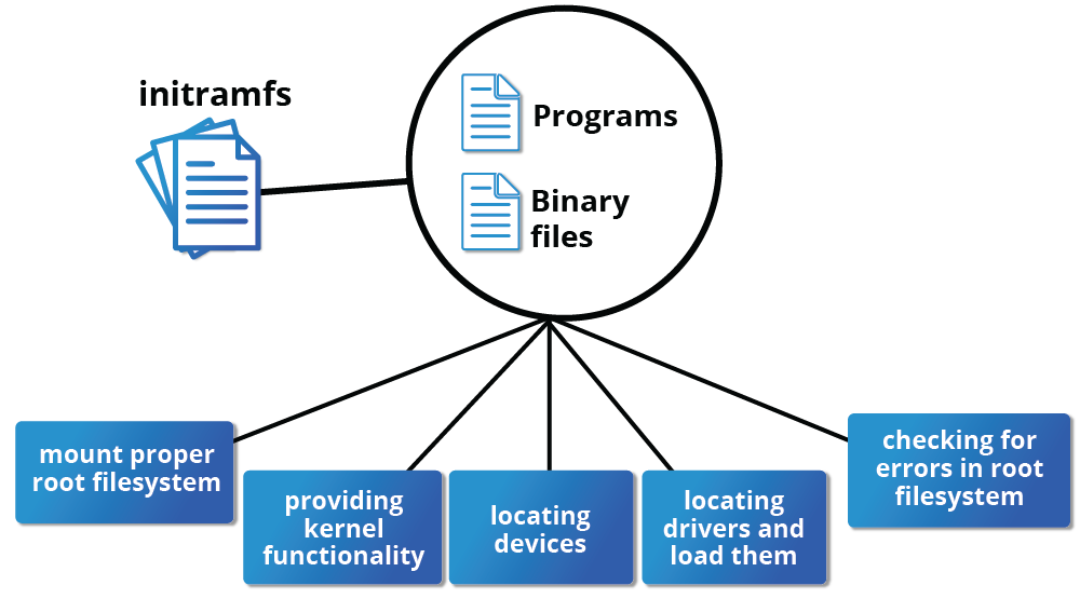
浅谈rootfs、initramfs和initrd
本文算是之前博客 使用QEMU安装并启动一个Ubuntu发行版 | Lordaeron_ESZ’s blog 的一个 callback,花了一天时间整理了一下有关 rootfs、initramfs 等操作系统启动相关的内容,并在此分享出来。 rootfs首先需要理解 rootfs(即根文件系统)的概念。本质上来说,rootfs 就是挂载在根目录(/ 目录)上的文件系统,而无关具体的文件系统类型。 另外,rootfs 根据系统启动时刻的不同,分为两个阶段,一阶段为系统启动初期的内存 rootfs(通常为 ramfs 和 tmpfs,下面将具体介绍),二阶段为完成基本的模块加载等操作之后的磁盘 rootfs(包括 ext4、zfs 和 btrfs 等等)。 ramfs 和 tmpfsramfs 只是一个简单的文件系统,用作一阶段 rootfs 的文件系统类型,它与磁盘文件系统最大的区别就在于 它没有可供回写的后备设备 ,以 Linux 6.12 内核版本为例(下同),其 ramfs 的代码实现: 1234567891011/* fs/ramfs/file-mmu.c */const...

2025-10-12
Linux内核物理内存管理器的建立过程
本文将介绍 Linux 内核中物理内存管理结构的建立过程,主要分为获取物理内存布局、早期内存管理器和最终内存管理器三个阶段,本文将以 x86_64 架构为例,内核代码基于 Linux 5.10 版本来介绍。 获取物理内存布局当 x86_64 系统启动,BIOS 将控制权交给 Bootloader(如 GRUB) 之后,此时 CPU 模式还处于 实模式 下,可以进行 BIOS 中断调用,Bootloader 将会通过反复调用(每次只能获取一段内存区域的信息) int 0x15 eax=0xE820 这个中断来获取计算机的物理内存布局。 0x15 号中断还有 0xE801, 0x88 的功能号,都用于获取物理内存布局,只不过功能更简单。 存储获取到的每段内存区域信息的数据结构如下,包括起始地址、大小、类型。 123456/* arch/x86/include/uapi/asm/bootparam.h */struct boot_e820_entry { __u64 addr; __u64 size; __u32 type;} __attribute__((p...

2025-10-28
QEMU训练营2025专业阶段实验解析
本人的研究方向主要是操作系统与虚拟化,平时接触最多的开源项目除了 Linux 内核外,便是 QEMU 了,不只是将它作为一个全系统模拟器和 VMM 来使用,还涉及到基于它的增量开发的工作。但这些基本都还是边做边学的,主要原因在于市面上一直缺乏系统性介绍 QEMU 的书籍和资料(我知道的仅有一本《QEMU/KVM 源码解析与应用》,但其主要专注于 QEMU 的 VMM 用途,对模拟器的介绍不是重点)。得知 OpenCamp 将举办 QEMU 训练营,我也是在持续关注,并且在第一时间报名并开展了学习。 截至现在,我已经完成了基础阶段和专业阶段的学习,正在等待项目阶段的开放。本文将分享我专业阶段实验的解题思路和方法,作为个人的一个记录,也为后续参与训练营的同学提供参考。 实验概述专业阶段的实验平台是由训练营主办方专门设计的一个简易的教学用板卡 G233,对它的介绍可以参考文档:b. G233 Datasheet - Learning QEMU Docs。 实验共有十个,归类下来总共有三类:lab1 主要是根据手册的说明,补全对 G233 板卡的模拟代码;lab2 ~ lab5 则是为...
2025-12-27
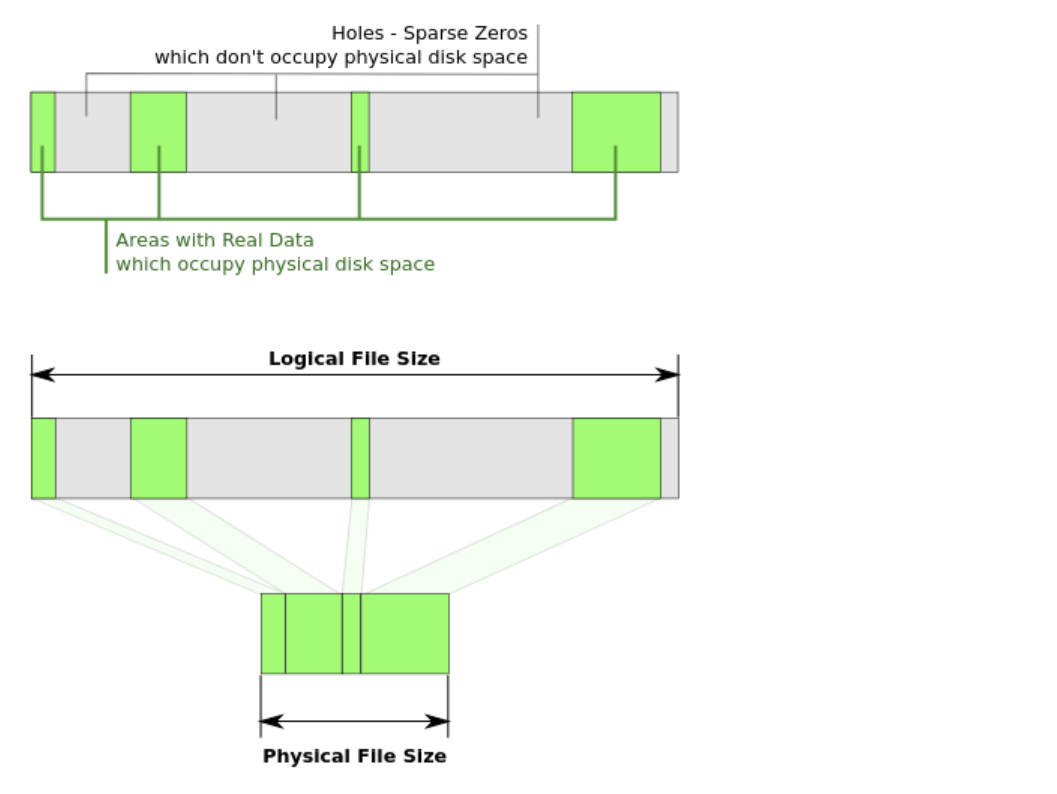
使用debugfs分析Ext2下的稀疏文件
本文将介绍 Ext2 文件系统下的稀疏文件表示,并使用 debugfs 对其进行分析。 环境准备12345678910111213141516# 创建一个 2G 大小的 Ext2 磁盘镜像文件dd if=/dev/zero of=ext2.img bs=1M count=2048# 生成一个 8M 大小的全零文件(非稀疏)dd if=/dev/zero of=8M.zero bs=1M count=8# 创建一个 8M 大小的 Ext2 格式化的镜像文件(稀疏)cp 8M.zero 8M.ext2mkfs.ext2 -F 8M.ext2# 将两个 8M 大小的文件拷入 ext2.img 中mkdir -p tmpsudo mount ext2.img tmpsudo cp 8M.zero tmpsudo cp 8M.ext2 tmpumount tmp 稀疏文件的本质稀疏文件即一个文件的起始位置到结束位置之间存在“空洞”(如下图所示),所谓空洞,就是该文件区域没有被分配任何的磁盘空间,体现在 Ext2 文件系统元数据的层面就是——对应的数据块指针为空。 更形式化的描述为:只要...

2025-09-07
Linux内核initcall初始化机制
本文将介绍 Linux 内核的初始化函数结构,其通过 initcall 机制来实现,其核心是一系列优先级不同的宏,用于控制初始化函数的执行顺序。本文的实验的内核环境基于 Linux 5.10。 initcall 的级别与执行顺序Linux 内核定义了多个初始化级别(按照执行顺序从高到低排列): 宏定义 级别名 优先级值 用途说明 early_initcall(fn) early - 早期的初始化,在 SMP 初始化之前 pure_initcall(fn) pure 0 用于初始化不能被静态初始化的变量 core_initcall(fn) core 1 核心子系统初始化 postcore_initcall(fn) postcore 2 核心子系统之后的初始化 arch_initcall(fn) arch 3 架构相关初始化 subsys_initcall(fn) subsys 4 子系统初始化 fs_initcall(fn) fs 5 文件系统初始化 rootfs_initcall(fn) rootfs - 根文件系统初始化 dev...

2024-05-06
OSTEP Projects:Reverse
本文将介绍操作系统导论(Operating Systems: Three Easy Pieces)作者所开源的操作系统相关课程项目 的 Reverse 部分,包含个人的代码实现和设计思路。 思路题目的要求很简单:按行读取数据,读取完成后将所读取到的所有行反向输出(行间反向,行内不变)。但代码实现上却包含不少细节。 首先是核心问题:如何将读取到行反向输出?首先可以确定的一点是:在所有行读取完成之前,读取到的每一个行都需要进行保存。那么,利用什么数据结构进行保存呢?我们需要这个数据结构能够确定输入的不同行之间的前后相对关系,因此想到使用线性表。由于最终读取到的行数是不确定的,因此不能使用一个固定大小的数组,而应该使用可变长的线性表,如链表、动态数组。而又因为可变数组的扩容操作比较耗时,且我们并不需要对元素进行随机访问,只需要最后输出的时候进行顺序遍历,因此链表就成为了最佳选择。 反转的具体实现可以参考经典问题反转链表,设定一个前驱结点 pre 和当前结点 cur,每次读取到新的行,就动态申请存储该行数据的内存空间,并将 cur 指向这块内存空间,然后将 cur 的 next 域指向...